Friday, 3 November 2017

Build a Simple Arduino Calculator

A Calculator is a device that is used to perform simple arithmetic operations to complex mathematical calculations. The rise of calculators can be seen from devices like Abacus to credit card sized complex electronic solid state devices in the modern day usage.
Apart from small calculators, which can be used to perform simple arithmetic calculations, calculators also come in complex scientific outlook that can perform various mathematical and statistical operations like trigonometry, algebra, calculus, etc. But such complex scientific calculators can be very costly.
In this project, we will design a simple arithmetic calculator using Arduino UNO, a 16 x 2 LCD display and 4 x 4 Matrix Keypad.

Circuit Diagram

Arduino Mail Notifier

Physical Mail or Post is a method of transporting documents, packages, cards, parcels and letters. This service is usually done by a postal service system. Mail is usually delivered by mail man post man to our homes. We get important documents like bills, invitations, bank statements etc. in mail.
If we don’t check our mail box regularly, we might miss the deadlines for payment of bills etc. It is a tedious job to regularly check for mail as mail boxes are often placed outside the house or in some cases, a common place at the end of the street.
Hence, in this project, a simple but efficient mail notifier system is designed using Arduino and few other components. This system notifies the user whenever there is a mail and hence avoiding the need to check for mail frequently.
The project is based on Arduino, RF Module (RF Transmitter and Receiver) and a light sensor (Photo resistor or LDR).

Circuit Diagram

Since the project is based on RF Modules, the circuit is divided in to transmitter and receiver.
The following image shows the circuit diagram of the Transmitter or Sender part of the project.

Arduino Home Automation Using RF

Home automation is one of in demand concepts in today’s world. Hobbyists do simple automation systems with the components readily available. If we are more concerned about the reliability and performance of the system, then we can go for the expensive Home Automation Consoles.
Home automation reduces the physical efforts and integrates the control for any number of appliances in to a single control unit. Hence, a simple home automation system is a remote control of different electrical appliances i.e. turning them on or off with the help of a remote.
There are many ways to implement this remote control system. With the extensive use of smart phones and tablets, Bluetooth may be the best option to implement the home automation. And one is implemented here in Bluetooth based Home Automation using Arduino.  The other methods of remote controlled home automation system are ZigBee, Wi-Fi, Radio Frequency (RF Module), GSM etc.
In this project, a simple but efficient home automation system using RF Module (Transmitter – Receiver pair) is designed. The system is designed with Arduino (ATmega 328) as the main processing unit.

Circuit Diagram

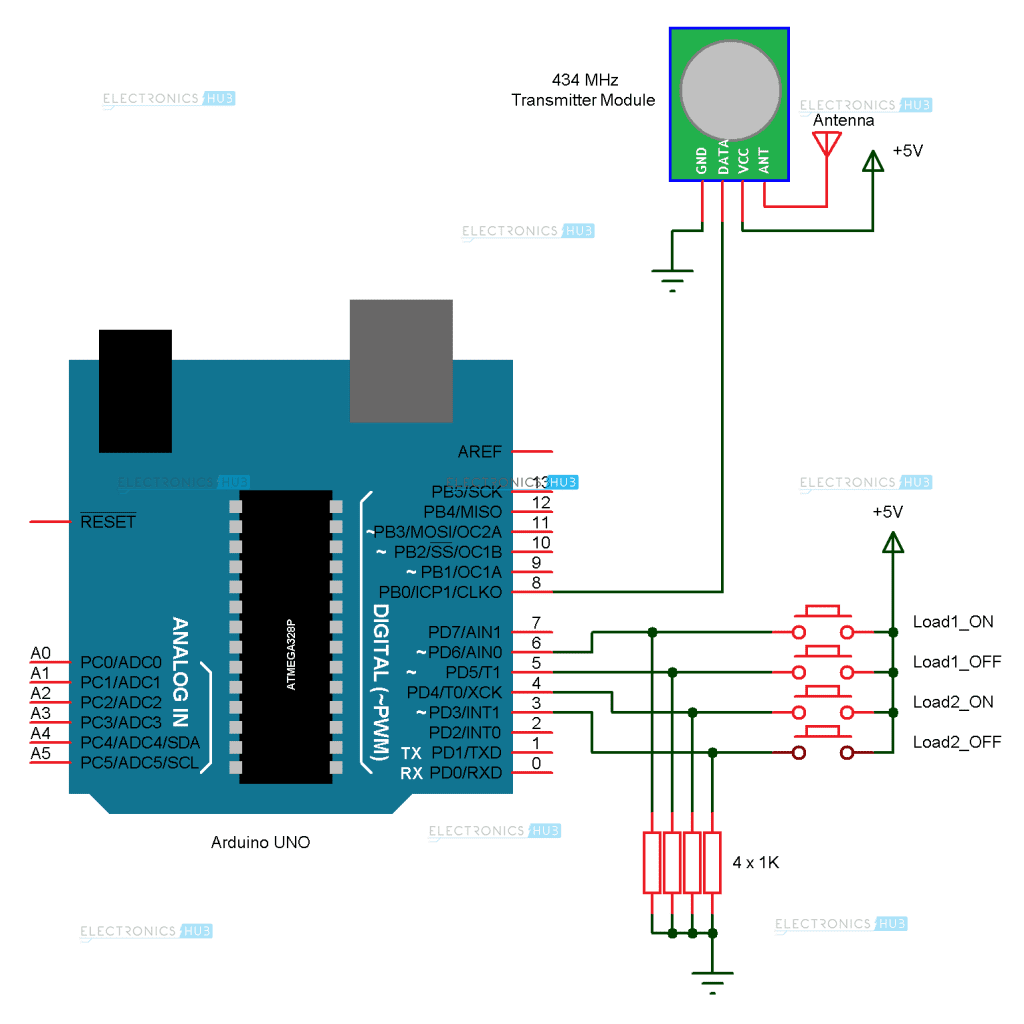
The circuit diagram is divided in to the transmitter section and receiver section for easy understanding. The transmitter section of the project is shown on the following image.

Thursday, 2 November 2017

Touch Dimmer Switch Circuit using Arduino

A Touch Dimmer Switch Circuit is a simple project, where the dimmer action is achieved with the help of a Touch Sensor. While a regular switch is used to simply turn ON or OFF a light, a Dimmer (or Dimmer Switch) will allow us to control the brightness of the light. Without a Dimmer Switch, the light bulbs tend to glow at full brightness consuming maximum power. If full brightness is not required, then Dimmer Switches can be used and save some energy. With the help of a Dimmer Switch, we can vary the brightness from fully off to fully on.
Different light bulbs need different dimmer switches and there are different types of Dimmer Switches available in the market. Some of the commonly found Dimmer Switches are Slider type and rotary type.
In this project, we have designed a Touch Dimmer Switch using Arduino. The Touch Dimmer Switch Circuit is implemented using a Touch Sensor. The circuit design, components and working of the project is explained in the following sections.


Arduino Based Color Detector

A Color Sensor, as the name suggests, is a device that senses or detects colors. A color sensor will use an external means of emitting light (like an array of white LEDs) and then analyse the reflected light from the object in order to determine its color.
Color sensors will give an accurate color of the object. There are a wide range of applications of color sensors like sorting objects by color, quality control systems, printer color enhancement etc.
In this project, we have designed a simple Arduino Color Sensor application, which has an ability to detect different colors. We have used TCS3200 color sensors for this purpose. Introduction to color sensor, circuit diagram and working of the Arduino Color Sensor project are explained below.

Circuit Diagram


Use 5v Relay Arduino

Arduino is a microcontroller based prototyping board that runs on small DC power. A Relay is a device that helps microcontrollers (or microcontroller based boards) like Arduino to switch on or off different household appliances like motors, lights, water heaters, television and fans etc.
Today, Arduino is being used for a wide range of applications like controlling LEDs, monitoring temperature, logging data and turning on motors etc. Another important task that can be accomplished by the Arduino is controlling a 5V Relay to operate high voltage AC appliances and devices.
Arduino family of microcontrollers, like UNO, Nano and Mega etc. can be programmed to control a simple 5V relay i.e. switch it on or off on the event of pushing a button, reading the value of temperature from a thermistor or just by setting up a predefined timer.


Arduino based Wireless Doorbell

Traditional Doorbells are wired devices and are usually fixed at one place. They are becoming obsolete because of these reasons and are gradually being replace by advanced Wireless Doorbell Devices. With a wireless doorbell, the position of the switch and the bell is not fixed.
We can place it anywhere we want and also the installation is pretty simple. The setup of wireless doorbell doesn’t require any internal wiring. Also, if the wired doorbell is not fixed while construction, we need to make holes for wiring and installation.
In this project, we have designed an Arduino based Wireless Doorbell using simple hardware. The project is implemented using RF Module for wireless communication and also an Arduino UNO board to analyze the data.